

July 9, 2026
New release changelog experience
The release changelog has been redesigned for faster browsing.What launched
- Tab filters: All, Product, Resources, Patches, and Announcements
- Infinite scroll with paginated loading for long histories
- Archive cutoff: posts before July 1, 2026 are available via Show Older Posts
Category guide
- Product: feature releases, dashboard updates, and integration changes
- Resources: documentation and guide updates
- Patches: bug fixes and minor plugin corrections
- Announcements: launches, GA notices, and strategic updates
Impact
No API or product behavior changes. This update affects how release notes are organized and displayed.July 7, 2026
Self-service merchant onboarding
Merchants can now create a Bolt account and start integrating without a sales call.What launched
- Self-service signup at merchant.bolt.com/onboarding
- Sandbox account creation with API key provisioning
- Platform selection and guided setup for common integrations
Where to start
- Create a merchant account: dashboard setup
- Quickstart: first integration steps
- API keys: find credentials in the dashboard
Impact
Existing merchant accounts are unchanged. New merchants can onboard independently in sandbox.July 3, 2026
New bolt.com/developers developer portal
Bolt launched a dedicated developer portal at bolt.com/developers.What launched
- Centralized API reference, integration guides, and SDK documentation
- Faster paths from overview to working API calls
- Links to Embeddable Checkout, Merchant API, and platform-specific guides
Where to start
- API quickstart: authenticate and make your first request
- API reference: endpoint documentation
- Postman collection: importable requests
Impact
No breaking API changes. Help content at help.bolt.com remains the canonical integration reference.July 1, 2026
New Bolt Help documentation site
Bolt Help has a new documentation experience at help.bolt.com.What launched
- Reorganized navigation across Get Started, Products, Platforms, API Reference, and Gaming
- Mintlify-powered pages with improved search, code examples, and mobile-friendly layout
- Clearer paths for merchants and developers integrating Bolt Checkout, Embeddable Checkout, and Gaming SDKs
Where to start
- Quickstart: first integration steps
- Documentation browse: full site map
- Bolt Checkout: product overview
Impact
No API or integration changes. Existing links and bookmarks continue to work through redirects.March 19, 2026
Renaming Bolt Ignite to Embeddable Checkout
Bolt Ignite has been renamed to Embeddable Checkout.What changed
- The merchant documentation has been renamed and relocated:
- API documentation has been updated:
Impact
There are no functional, API, or integration changes. This update affects naming and documentation structure.SFRA Order Status Mappings Have Changed
The New SFRA order statuses have changed to better reflect each order’s state within the SFRA dashboard. See the table below for the new order status mappings.| SFCC order status | SFCC payment status | SFCC Export Status | SFCC Confirmation Status | Bolt Status | Description | Previous SFCC order status |
|---|---|---|---|---|---|---|
| Created | Not Paid | Not Exported | Pending | The order is created in Bolt but is under fraud review. Payment is not yet captured. | New / Open | |
| Failed | Not Paid | Not Exported | Rejected_irreversible | The Bolt transaction is rejected for fraud. | Cancelled | |
| Created | Not Paid | Not Exported | Not Confirmed | Rejected_reversible | The transaction is suspected of being fraudulent, but the merchant may force override the decision. | New / Open |
Abandoned Carts v2.0
Checkout merchants can now access the newest version of our Abandoned Carts product. Enhancements include:- Items pre-populated in checkout
- Intelligent notification intervals
Merchants already using Abandoned Carts will have the opportunity for a temporary free trial. Reach out to your Bolt representative or to Bolt Support for more information.
New
- Added support for WooCommerce High-Performance Order Storage.
Improved
- Fixed issue where a
nullor failed response from Bolt’s server causes a page rendering error.
Resources
New
- Added support for WooCommerce FedEx Shipping.
- Added support for WooCommerce ShipperHQ.
Improved
- Fixed compatibility issues with multiple third-party plugins which we already support, including:
- Fixed issue where
subscriptionwas showing as an undefined index. - Fixed issue with Load Bolt
PaymentOnlykey on non-checkout page. - Fixed issue where plugin attempts to
get()session value beforeWC()->sessionis initiated, which returnsWC()->sessionasnulland causes errors for subsequent calls onWC()->session. - Orders no longer duplicate when payment fails once.
Resources
SFCC Composable Framework for Bolt
Bolt has expanded our Bolt Checkout offering for our SFCC platform build to supprt SFCC Composable Storefronts.Merchants using the SFCC Composable Storefront can now implement SFCC for Bolt Checkout using our SFCC Composable Framework implementation guide.Passkeys in Bolt Embedded Accounts
Bolt is expanding our Passkeys product to now be included in Bolt’s Embedded Accounts package. Any Bolt merchants using our Accounts product will soon automatically have access to this feature.Your Customer Success Manager will reach out soon to coordinate a smooth enablement of Passkeys into your stack.Read more about Passkeys here.Google Pay for Bolt Payments
Bolt has enabled an integration for Google Pay for use with our Bolt Payments product. This connection can be implemented in the Merchant Dashboard.Read more about Google Pay and Bolt Payments.New
- Support added for Extended Warranty.
Improved
- Fixes a bug where the customer coupon code usage limit was not restored after failed payment.
- Fixes a bug where the Bolt mini cart button would not always render in the Fetch Cart flow under some conditions such as a slow internet connection.
Resources
Dashboard Activity Log
The Dashboard Activity Log is now available to merchants in the Admin > General section of the dashboard.Only Administrators, Developers, and Contractors can access the Activity Log. More information on roles can be found in our Manage Users article.
- changes to user roles,
- changes to Checkout settings, and
- changes to your account’s business information.
Product Recommendations for Custom Cart
Product Recommendations display various product add-ons within the Bolt Checkout Modal, tailored to what you returned based on the shopper’s current cart. Shoppers can select and add these extras to their cart, enhancing their shopping experience.Read more about the Product Recommendations.Improved Merchant Onboarding Form
We’ve made improvements to our merchant onboarding process. This includes a new Onboarding Form that collects less information upfront and allows you to explore your dashboard and sandbox environment quickly!Learn more about creating and configuring your new Merchant Account here.Bolt Payment Set Up in Dashboard
The Dashboard now has pages where you can enter payment and other company information to set up and configure Bolt Payments.Learn more about setting up Bolt Payments here.Accounts Component Styling - Version 3
Merchants can now choose to use or upgrade their Accounts Payment Fields Component Styling from version 2 to version 3.The newest styling methodology uses a pseudo class structure to build out targeted and specific styling for any and all Bolt Components on a page.Bolt plans to utilize this styling methodology for other on-page components in the future. We highly recommend upgrading to this new styling to see the benefits of consistent styling across many components.Product Page Checkout for SFCC Embedded
Bolt’s Product Page Checkout feature is now available for merchants using SFCC Embedded.This feature enables shoppers to check out directly from the product’s landing page.Bolt SSO for SFCC Embedded
Bolt’s SSO feature is now available for merchants using SFCC Embedded.This feature enables shoppers to quickly log into their Bolt Account via your site.Passkeys in Bolt Checkout
Bolt is expanding our Passkeys product to now be included in Bolt’s Checkout package. Any Bolt merchants using SSO or Bolt Checkout will automatically have access to this feature.Read more about Passkeys here.Colorado Delivery Fee Feature Updates
Bolt’s Colorado Delivery Fee feature is now completely self-serve for BigCommerce, Custom Cart, Magento 2, and SFCC merchants.Merchants can now log into their dashboard to enable and configure the fee.Read more about how to enable the Colorado Delivery Fee.Money Movement Statement Updates
Merchants using Bolt Payments or Bolt Fraud can now export their money movement statements by month or by custom date range from the Disputes section of the dashboard.Read more about the disputes section of the dashboard.Read more about how to export disputes statements.Audit Log for Self-Service Disputes
Merchants using Bolt Payments and Self-Service Disputes can now audit the actions taken in their Self-Service Disputes dashboard by exporting an audit log.Read more about how to export the audit log.Google Analytics 4 Support
Bolt now supports Google Analytics 4. Any merchants using Google Tag Manager should upgrade to Google Analytics 4. If you are already using Google Analytics 4, follow the listed instructions to ensure it is properly configured in the Merchant Dashboard:New
- Merchants can now create their own style variants of the Bolt Button for their Product Page checkout button.
- Support added for the Mageworx Donations suite.
- Support added for the Amasty Affiliate Plugin.
Improved
- Fixes a bug in the M2 Admin Portal that impacted the visibility of the sales order void button after order void in the M2.
- Fixes a bug in the M2 Admin Portal that prevented merchants from using different Bolt Divisions at the M2 Store level. Previously, this was only possible at the website level.
Resources
Mobile Side Cart Updates
Bolt has release updates to its mobile side cart design. Shoppers checking out with merchants using Bolt Checkout will notice that they can view their cart directly below the checkout flow on any checkout step, rather than being taken to another page or opening up a modal over the checkout flow.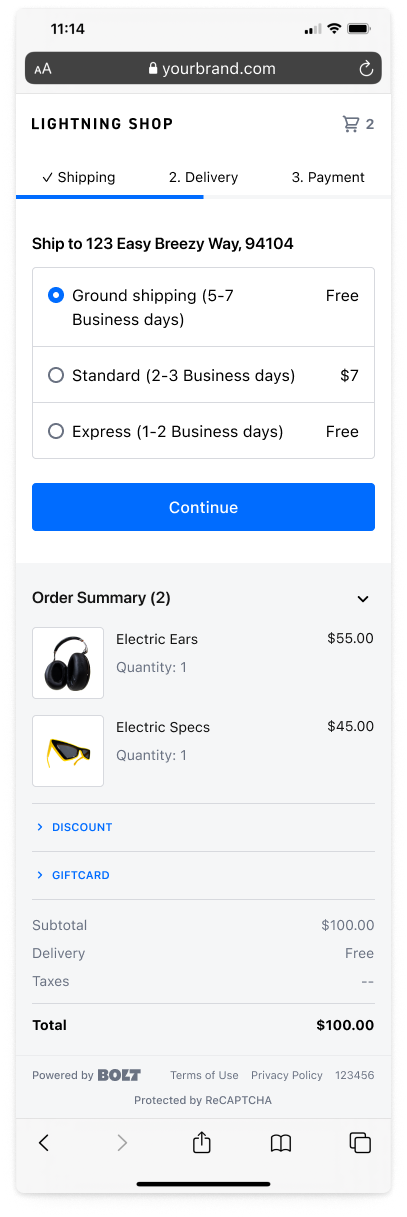
Modular Embed.js Script Option
Bolt has released an updatedembed.js script for merchants using our Account product and related add-ons.This updated version of the script offers quality improvements such as:- Increased performance.
- Compatibility with future components.
- More efficient load processes.
- Stable bundle sizing.
Discount Display for Checkout for Magento 2
Bolt merchants using Magento 2 can now enable Discount Display for their checkout. When enabled, shoppers can see pre-configured discount labels instead of just the discount code in the Bolt Checkout modal.For example, if a merchant has configured a discount label in the Magento Admin dashboard as10% off, a shopper will see 10% off instead of their inputted discount code of random letters and numbers.Merchants must be using Bolt’s Magento 2 API product with Fetch Cart enabled.Read more about how to enable the Discount Display feature here.The New
Merchants using SSO Commerce can now allow their shoppers to log into their storefronts using Passkeys. Passkeys are a secure way to authenticate with biometrics, meaning a shopper can sign in using their face or fingerprint, instead of a password or one-time code.Learn more about SSO Commerce and Passkeys.Information for Shoppers
Shoppers can currently only manage Passkeys from a mobile device. Passkeys will come to other devices soon.Learn more about creating and managing Passkeys.The Improved
In the rare event that a merchant’s SSL certificate for Apple Pay expires, the Apple Pay button will immediately be removed from the Bolt Checkout to prevent broken shopper experiences.Learn more about how Bolt manages Apple Pay SSL certificates.The New
Bolt’s APIs now support idempotency requests for allPATCH and POST endpoints. Bolt ensures requests are idempotent whenever an Idempotency-Key: header is specified.Read more about idempotency keys in the Idempotent Requests article.The New
Merchants using the Direct API or bespoke version of Bolt Accounts can now further customize their payment fields with new styling and argument options.Styles
Bolt has added two new styling options:inputPaddingSize, which adjusts the spacing between input text and the borderborderStyle, which customizes the border of input fields
Arguments
Bolt has added a new argument calledshowFieldMissingErrors, which shows or hides errors when the user visits a required field but leaves it empty.Additionally, the expiryType field has a new option called separated-dropdown-numerical, which will display separate dropdowns for the month and year of a card expiration date.The New
Shoppers of merchants using Bolt Accounts will see a new banner indicating their login status and giving them options to learn more about Bolt or to log out of their Bolt Account.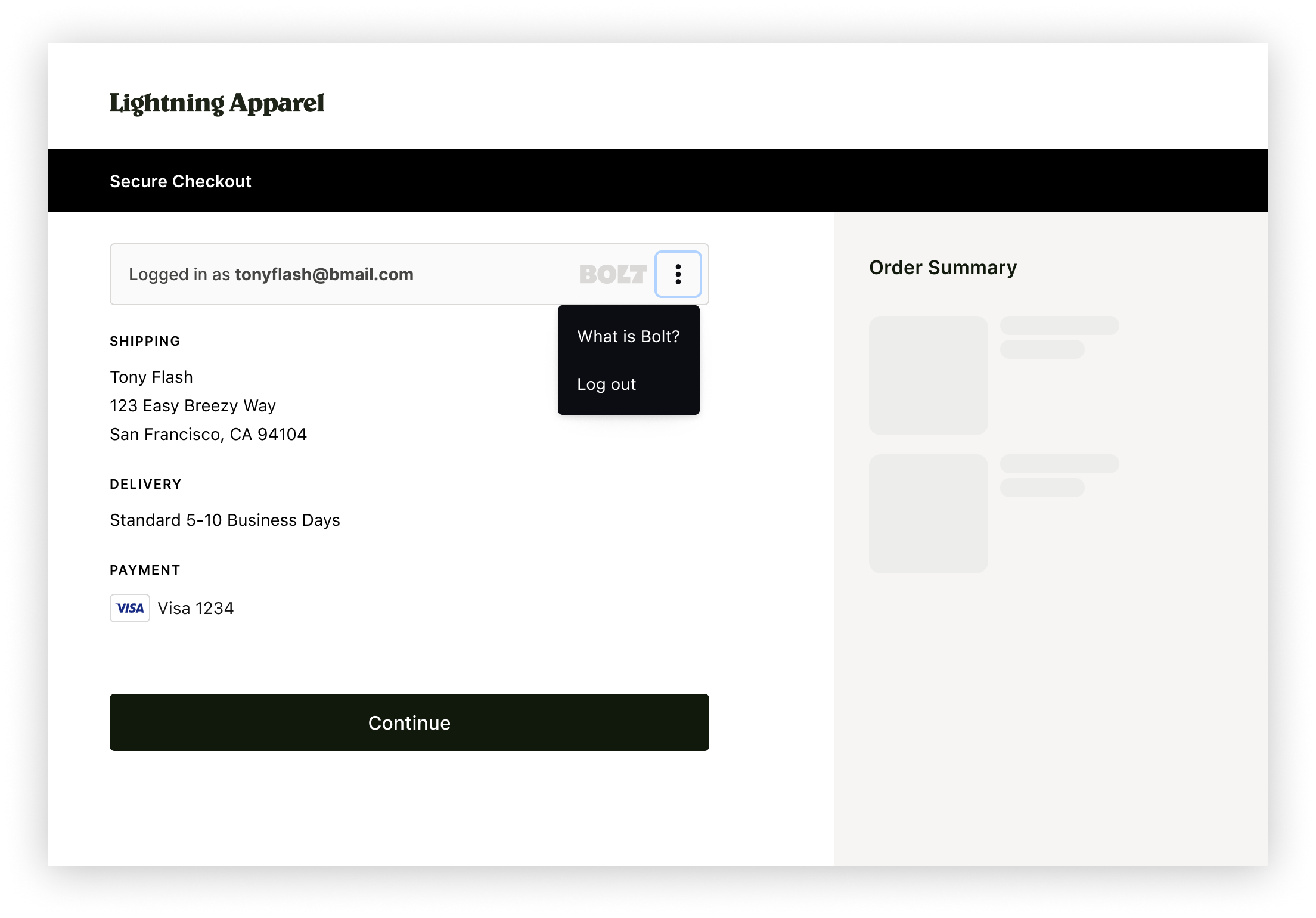 There is nothing a merchant needs to do to implement this, as long as they have properly implemented the login status component.
The New
Shoppers of merchants using Bolt Accounts, who only have an email address associated with their Bolt Account, are now asked to enter and verify their phone number after they are correctly identified via their email address. This new step further secures their Bolt Account and provides an additional method for identity verification and account management.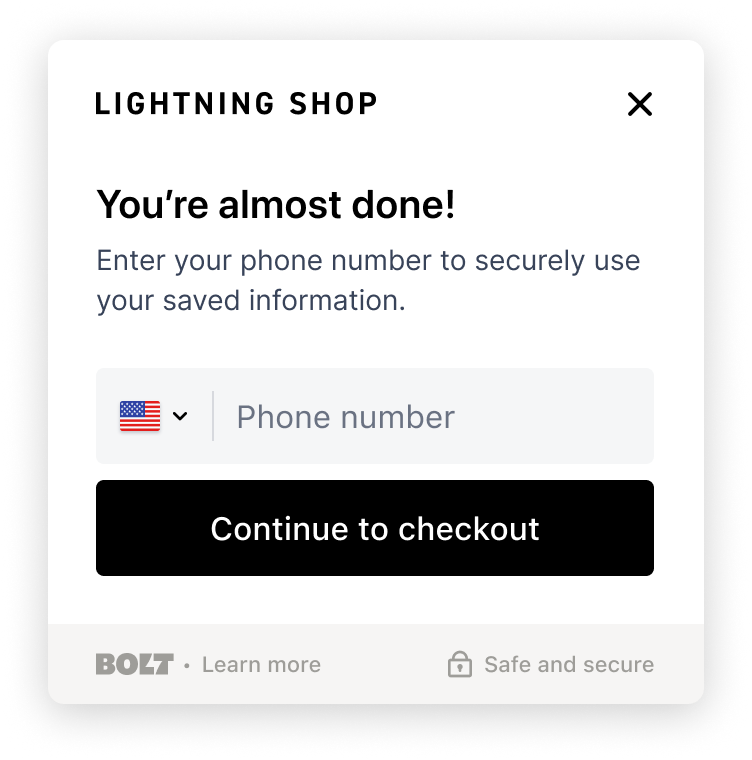 There is nothing a merchant needs to do to implement this, as long as they have properly implemented the Authorization component.
The New
Merchants using Authorize.net for payment processing can now offer Google Pay as an alternative payment method (APM). Google Pay for Authorize.net is currently available to participating Beta merchants.Learn how to enable Google Pay with Bolt.Gift Cards Placement Experiment
Bolt is seeking merchants to participate in an experiment optimizing checkout by moving the gift card fields to the payment step.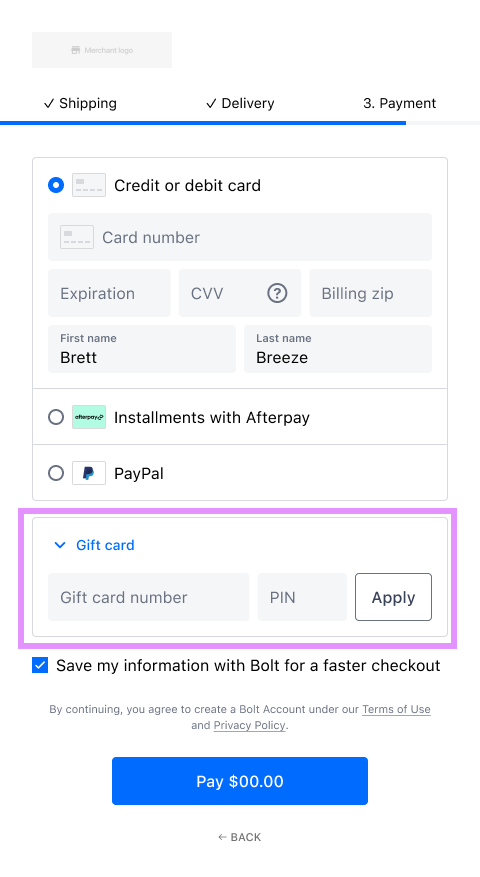
Why optimize the gift card placement?
- Our hypothesis is shoppers think about using gift cards during the payment step, not earlier.
- Presenting the opportunity to enter gift cards during the payment step reduces checkout complexity.
- Moving gift cards to the payment step clearly separates them from discounts, making it easier for customers to use them.
- Gift cards at the payment step is the industry standard for ecommerce.
The New
We’ve updated the Bolt for BigCommerce plugin to optimize the order creation process behind the scenes.Using BigCommerce’s new payment API:- You can expect fewer order creation errors.
- Orders are always marked as “Captured.” In previous versions, payments were occasionally left uncaptured.
- Orders created via Bolt will appear as created by BigCommerce in the dashboard and no longer display the device the shopper used to create the order.
Action Item
Update your Bolt plugin in the BigCommerce Dashboard to ensure checkout works as intended.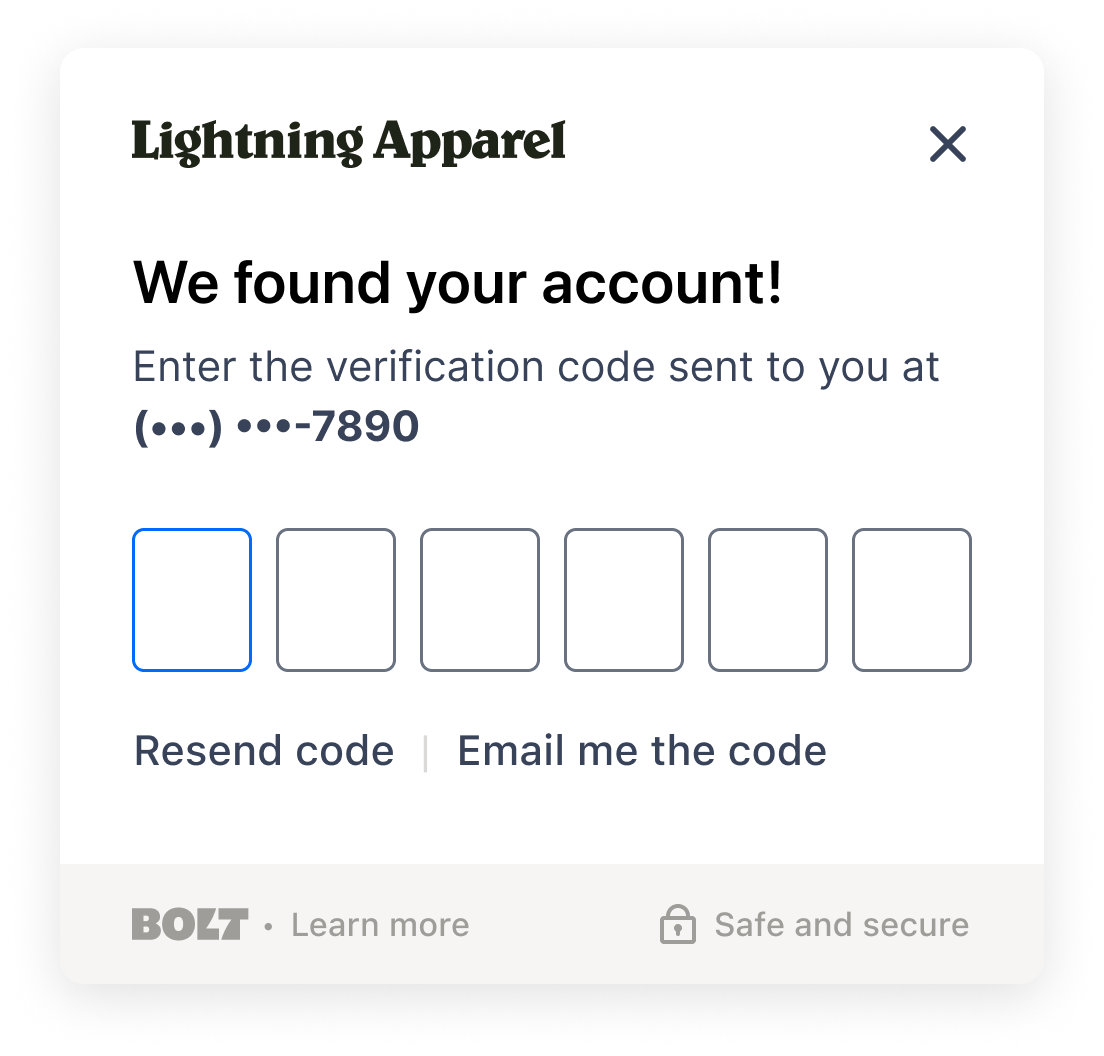
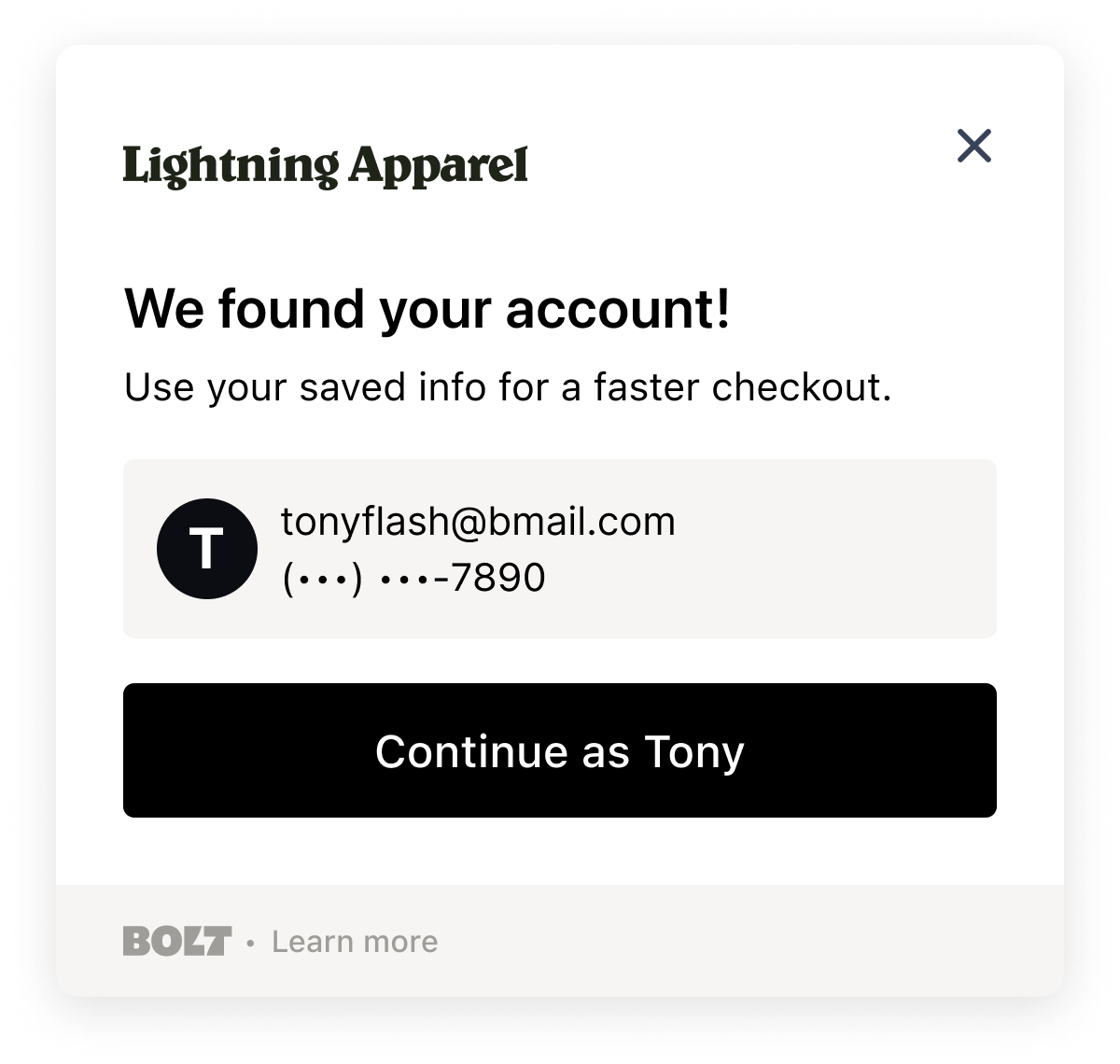
Bug Fixes
- Ensures plugin compatibility with Magento Version 2.4.6..
The New
Bolt has released a new Merchant Dashboard design with an improved navigation that streamlines the Bolt workflow and includes several new features.Upgraded Features
- With Self-service Disputes, quickly take action on chargebacks and review the status of ongoing disputes.
- Bolt has introduced Alternative Payment Method Google Pay, with more new ways to pay being added all the time.
- The revamped Transactions timeline allows you to see an at-a-glance view of orders.
- Added fraud protection allows merchants to block specific emails and IP addresses from transacting. Prevent known fraudsters from purchasing items on your site.
Design
- The new navigation prioritizes workflow, grouping tasks intuitively to maximize productivity. Settings have been improved to work more predictably.
- Filtering and pagination is improved across the dashboard experience.
Analytics
- Key data is consolidated and reports optimized to improve readability, increase user engagement and reduce cognitive load.
Maps in Checkout
Bolt has released a new Checkout Setting that allows shoppers to view their address as they checkout. Learn more about this new Checkout Setting in the Maps for Checkout article.This feature is turned on by default. Bolt Checkout merchants should contact their Customer Success Manager to turn the setting off.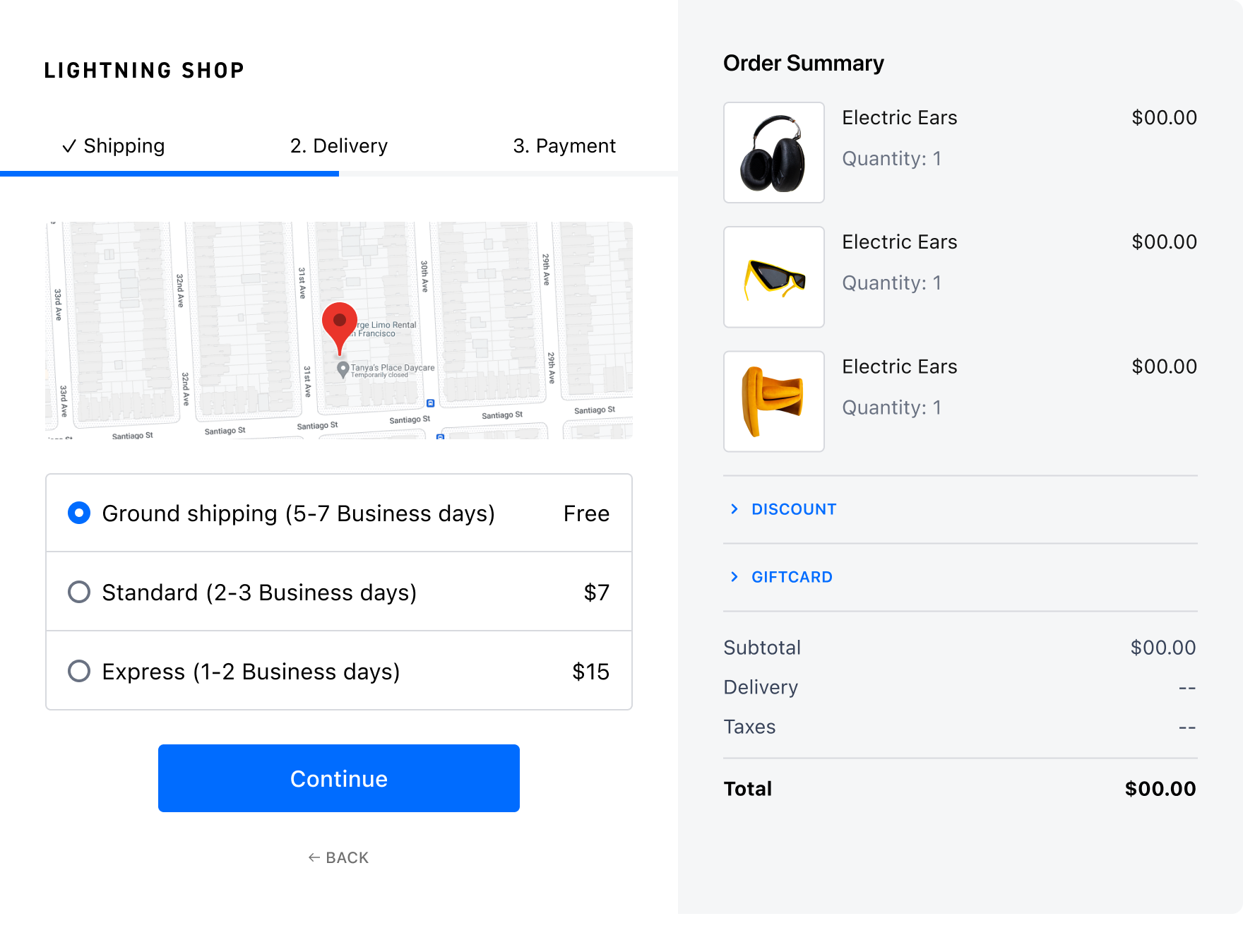
The New
- Logic that calculates cart totals and sends cart information has been migrated to the Bolt backend. This gives Bolt engineers the freedom to easily debug and improve add-to-cart logic.
Bug fixes
- Fixes minor issue that caused Magento plugin to display an error when modifying certain products’ inventory to “Out of Stock”.
The New
Bolt has renamed our core products to promote ensure clarity and distinction between our primary offerings.The Improved
Bolt is improving authorization rates by including the shopper’s IP address in our approval processes. This applies to both guest and logged-in shoppers.You must already be using Embedded Accounts.About this Functionality
- The
/v1/account/existsendpoint will create a record of the shopper’s valid email address and IP address. This data is retained only for the time strictly necessary to successfully authorize a transaction. It is then deleted from our servers. If you wish to use this particular functionality, this endpoint must be called from the browser. - IPs are stored when a Shopper OAuth (login) session is created (either via our Authorization Modal or Auto Login component).
- The
/v1/merchant/transactions/authorizeendpoint will retrieve the shopper’s IP address using the email provided in theuser_identifierfield, if available. - If you are using Adyen as your payment processor, Bolt will securely pass the Shopper’s IP directly to their service.
How to Implement
Most merchants have already set up their Accounts components to collect the needed information to implement this functionality. Check your configuration using the list below to ensure proper setup.To implement this new functionality:- When detecting shopper accounts, call the
/v1/account/existsendpoint from the browser. - Require shoppers to enter their emails during checkout, then pass that email value in an authentication call (using the Embedded API) to the
user_identifierobject as theemailfield. - Provide OAuth tokens in the same authentication call.
The New
Simplify your dispute response workflow with Self-Service Disputes. You can manage and represent chargebacks by submitting evidence directly in the Merchant Dashboard.Refer to our Self-Service Disputes Guide for more information.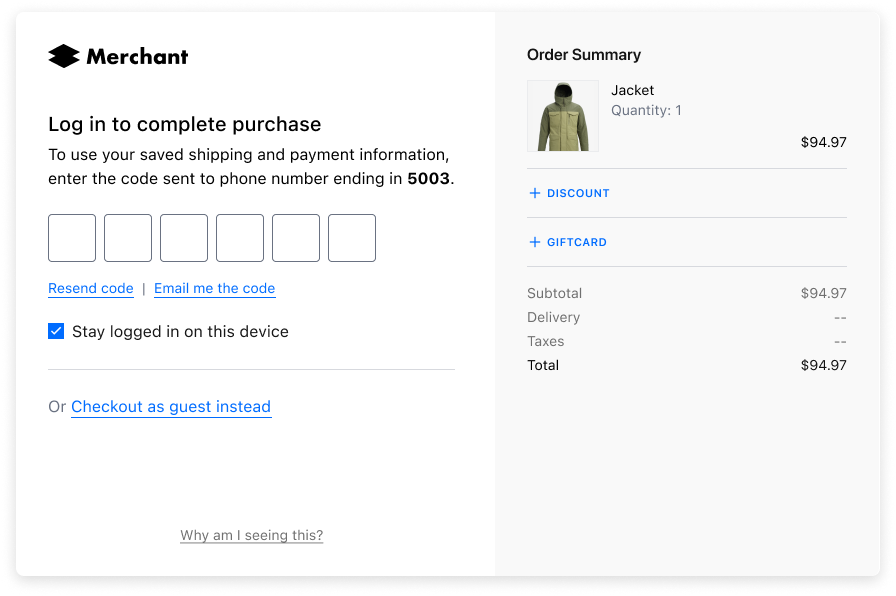
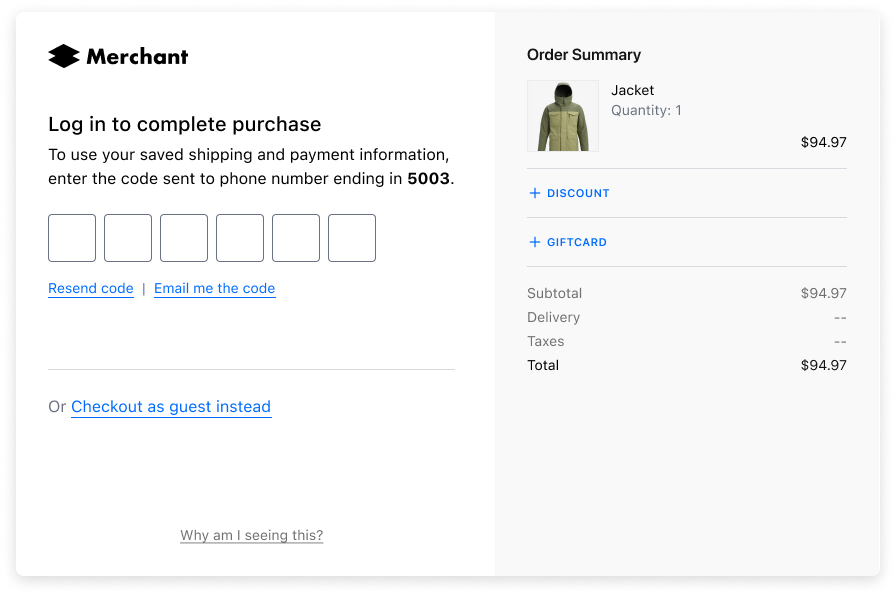

New
You can now add arbitrary or additional information to any of the accounts objects in either our Bolt or Embedded APIs using the Metadata field.Metadata is a key-value pair object that can be added to addresses, payment methods, or the account profile. The metadata field is not read or used by Bolt, and thus can be used to attach information that is helpful for you and not necessary for interacting with Bolt.Read more about this new field and see examples in our Embedded Metadata reference article. Or, you can see it in action in our Bolt or Embedded APIs.The New
- The plugin now supports Wholesale for WooCommerce.
Bug Fixes
- Fixes issue where order statuses were not properly updated when payment was completed.
-
Resolves issue where the plugin returned a
nullcustomer value when applying a coupon via the Bolt modal. - Prevents issue where adding an item to a cart with a cart fee results in a checkout error.
-
The plugin now correctly reflects Amazon Pay and Paypal order refunds as
In Progress.
Bug Fixes
- Fixes issue where shoppers could not add items to cart using Safari after logging in using the Bolt Shopper Assistant.
- Fixes intermittent issue where checkout with Apple Pay was interrupted when used in combination with certain payment providers.
The New
When a card authorization is declined by the processor, merchants can now view the reason for the decline on the transaction details view in the Bolt Merchant Dashboard. This enhancement makes the decline codes human-readable and helps merchants understand next steps.This enhancement is available to merchants using Bolt Payments, Adyen, Braintree, and Stripe.Embedded Components Localization
Bolt’s Embedded Components now supports automatic language detection and localization for the following languages:- English (United States / United Kingdom)
- German (Germany)
- Spanish (Spain)
- French (Canadian)
- Dutch (Netherlands)
- Portuguese (Portugal)
The New
The Adobe Quick Checkout plugin now supports device-based automatic login for users with Bolt accounts. See more information on Adobe’s Changelog. To enable this feature, update your Adobe Checkout plugin per the documentation.This feature requires you to use a supported version of M2. See Adobe’s Released Versions to confirm.
The New
Bolt now supports Google Pay as an alternative payment method for merchants using Braintree or Stripe for payment processing.To offer Google Pay to your shoppers during checkout, learn how to enable Google Pay with Bolt.The New
Merchants using Bolt Accounts can now use Account Linking to match and connect their store accounts with existing Bolt Accounts.Read more in our Account Linking article.Shopper Account: Logout of All Devices
Shoppers can now logout of all devices from their Bolt Account.Read more in our Logout of All Devices article in our Shopper help documentation.Shopper Account: Manage Store Permissions
Shoppers can now remove stores from accessing their Bolt information from their Bolt Account.Read more in our Manage Store Permissions article in our Shopper help documentation.The New
- Enables M2 for subscription functionality.
Bug Fixes
- Fixes intermittent issue where some logged-in users could not check out if Route was enabled.
- Merchants can now filter orders by specific Bolt payment method e.g.,
bolt-visa. - Fixes intermittent issue where data may not send to third-party integrations.
The New
Static Product Recommendations are now generally available with Shopper Assistant on storefronts. This feature allows merchants to select featured products to display to shoppers in a persistent widget on their storefront. To enable this feature, see Set Up Shopper Assistant.The New
- Route Shipping insurance is now supported for M2.
Bug Fixes
- Fixed issue with Amasty Reward Points that caused points to appear at checkout after being removed.
- Fixed issue that allowed discount codes to be applied after checkout reload in some rare instances.
The New
Bolt now allows you to rotate API keys and your signing secret. It is best security practice to rotate these credentials on a routine basis. See Key Rotation to learn more.The New
The Shopper Assistant is now available to merchants using Adobe Commerce.The Improved
The following improvements to gift card functionality are now generally available:- Gift cards are no longer grouped with discounts in checkout. This enables shoppers to apply a discount and pay with a gift card.
- Each applied gift card displays on its own line in the order summary, which helps shoppers understand if their gift card covered the total balance. This also creates more accurate ledger data.
The New
The Shopper Assistant is now available to merchants using Adobe Commerce.The New
- Now supports Free Gifts for WooCommerce plugin.
- Now supports WooCommerce Dynamic Pricing plugin.
Bug Fixes
- Fixes issue where WordPress administrator index page threw an error related to the Bolt plugin.
- Fixes
undefinedconstantBoltCheckout\id. - Fixes issue where negative fees were treated as discounts.
- Resolves issue where merchants could not sync order meta data between WooCommerce and Route.
The New
Shopper Insights are now available in Beta within the Redesigned Merchant Dashboard. Shopper Insights provide more data about how products perform on your store and allow you to gain insight into shopper behavior.The Improved
- If a merchant has accounts that are migrated from other merchant accounts, there is no longer a need to enable notifications to go out to the shopper about the shared accounts.
- We also updated the shopper login module with a new, sleek look that better explains what Bolt is and to create trust with shoppers.
The New
Bolt has released the Merchant Dashboard Redesign. We’ve reimagined the dashboard to showcase all the Bolt products and features you love, and included more actionable data about their store with Store Insights.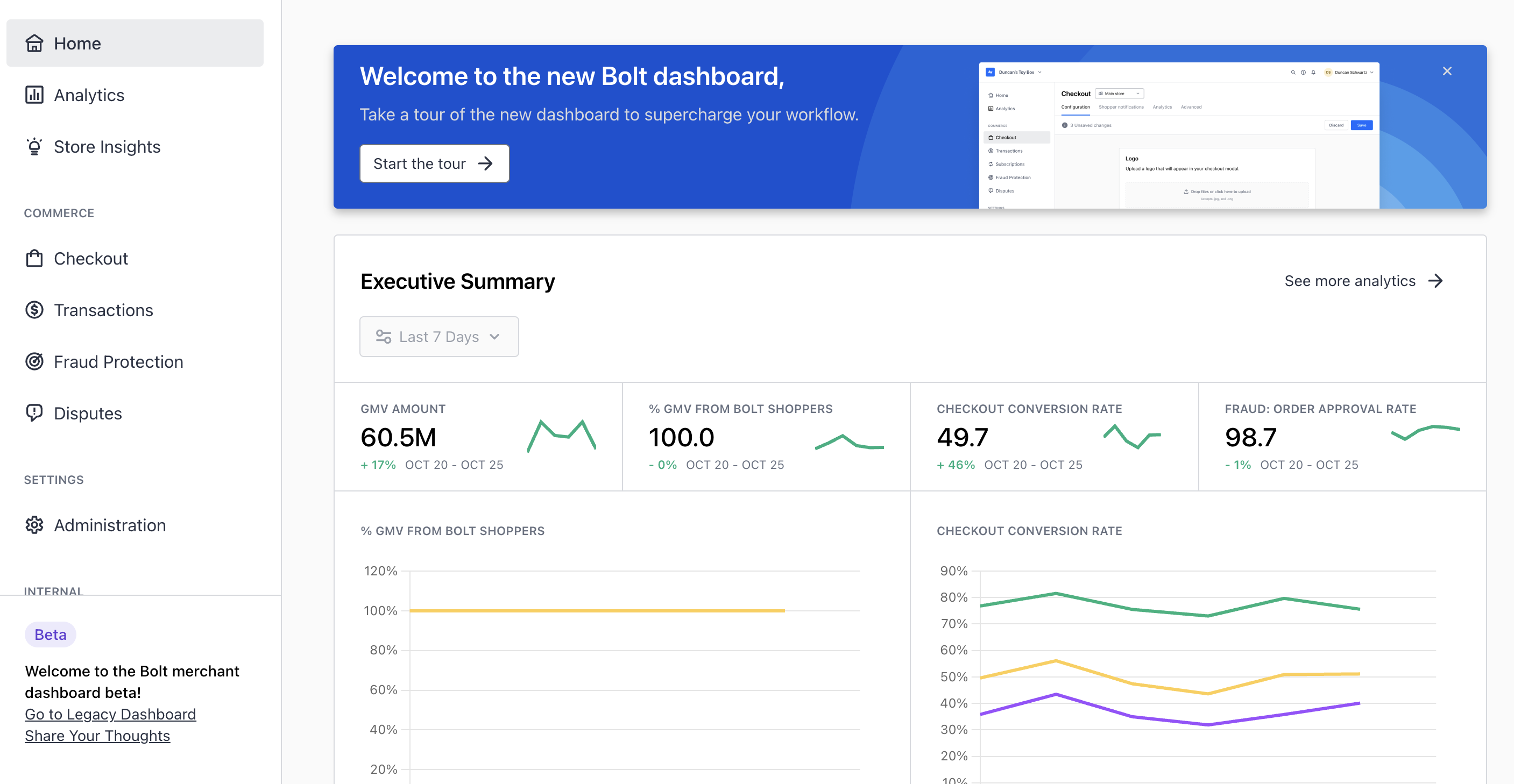 To switch to the new dashboard, login to Bolt and click Switch to Beta within the banner at the top. You can switch back to the old dashboard experience by clicking Go to Legacy Dashboard at the bottom of the new menu.
The New
Bolt now offers device-based automatic login during checkout, which recognizes active sessions on verified devices to skip the authentication step. This feature is designed to reduce friction while keeping shoppers’ data secure.- Verified device: After a shopper successfully authenticates via one-time verification code, this device is now verified and eligible for automatic login during checkout via device token.
- Unverified device: When a shopper creates a Bolt account during checkout, they do not have to complete authentication via one-time verification code, so this device is considered unverified. Logging in during checkout on another device forces logout on this unverified device to protect shoppers’ personal data.
Limitations
This feature is not currently available to merchants who use SSO.The New
Bolt now offers merchants the ability to route each type of checkout to a different processing method depending on whether a shopper has a Bolt account. Experience Bolt Checkout where it works best for you: complete granular A/B testing with confidence, or retain full control over portions of the checkout experience.The Improved
The Checkout Links construction process has been improved to provide more transparency into the checkout link structure, as well as enabling the creation of links at scale. Merchants still need to reach out to their customer success managers to enable and construct Checkout Links.Read more about Checkout Links.The New
Bolt now offers merchants the ability to route each type of checkout to a different processing method depending on whether a shopper has a Bolt account. Experience Bolt Checkout where it works best for you: complete granular A/B testing with confidence, or retain full control over portions of the checkout experience.The New
When card authorization fails, shoppers now see targeted error messages that encourage them to complete checkout with another card or payment method, depending on the reason for failure and the payment methods offered by the merchant.The New
A Postman Collection for Bolt’s APIs is now available. See Bolt Postman Collection for details.The New
Merchants with custom cart implementations using Accounts can now invoke an analytics method that tracks checkout funnel events.The New
To help your shoppers better understand who to contact when they have questions, Bolt made a few updates to the following email types:- On Hold transactions
- Rejected transactions
- Micro Authorizations
- Header titles clearly stating your business name + via Bolt
- Your support email address as the Reply To direction
- noreply@bolt.com as the sending address
- Direct links in the email about what Bolt is, to better inform your users
Authorize.net Transaction Syncing
Now generally available, Bolt ingests Authorize.net webhooks so that post-authorization actions are reflected in both the Bolt Merchant Dashboard and the Authorize.net dashboard.This promotes data integrity for future reporting and keeps your systems in sync.The New
Bolt’s Shopper Assistant now displays a Buy It Again tab so shoppers can easily add recently purchased items to their cart.The New
Checkout Links is now generally available to all qualifying merchants. Reach out to your Bolt Customer Success Manager for more information and to enable this feature.The New
Now generally available, Bolt’s order confirmation and tracking pages support a branded, modern experience for shoppers.For shoppers:For merchants:The New
When a shopper clicks an order within the Shopper Assistant, order information now displays directly in the widget instead of redirecting shoppers to the merchant’s site.Depending on the status, the order details page now prompts shoppers to take the following actions:- Track order, if order is in progress
- Reorder the whole order, if order is complete
The New
Merchants using SSO Commerce will now see that their shoppers can log into their Bolt Accounts using their Google or Apple accounts, in lieu of OTP. This enables an even faster authentication through a secure authentication process. Merchants do not need to do anything to implement or enable this feature.For more information, see our Social Authentication help article for shoppers.Authorize.net Transaction Syncing
Bolt now ingests Authorize.net webhooks so that post-authorization actions are reflected in both the Bolt Merchant Dashboard and the Authorize.net dashboard.This promotes data integrity for future reporting and keeps your systems in sync.The New
Bolt’s Fraud Protection is now available with embedded checkout to merchants who meet certain annual GMV qualifications.The New
Bolt’s Shopper Assistant now displays a Buy It Again tab so shoppers can easily add recently purchased items to their cart.The New
Users who already have a shipping address or payment method saved through their merchant account are converted to Bolt network accounts upon login. With in-context notification during sign up, shoppers are notified of their new Bolt account when checking out.This feature is now generally available.The New
When a shopper clicks an order within the Shopper Assistant, order information now displays directly in the widget instead of redirecting shoppers to the merchant’s site.Depending on the status, the order details page now prompts shoppers to take the following actions:- Track order, if order is in progress
- Reorder the whole order, if order is complete
The New
To align with industry practices and reduce friction, the shopper authentication process now involves fewer clicks with the following enhancements:- Automatically detect & authenticate shoppers with an existing session
- After a shopper enters their email address, automatically proceed to the verification step
- Automatic login upon entering the verification code
- BigCommerce Accounts One-Click
- Accounts
For Shoppers
Bolt’s Shopper Assistant now includes a tab with your recently viewed items so you can pick up shopping right where you left off.For Merchants
The Recently Viewed widget in the Shopper Assistant is now generally available. To get started, refer to Set Up the Shopper Assistant.Gift Card Enhancements - Beta
Gift cards are no longer grouped with discounts in checkout. This enables shoppers to apply a discount and pay with a gift card.Each applied gift card displays on its own line in the order summary, which helps shoppers understand if their gift card covered the total balance. This also creates more accurate ledger data.The New
Bolt’s order confirmation and tracking pages now support a branded, modern experience for shoppers.For shoppers:For merchants:The New
Merchants with this feature enabled can allow their shoppers to donate custom values to listed donations. Previously, shoppers could donate via prefixed round-up or percentage amounts.The Improved
This feature is supported for Custom Carts.Additionally, donations as a whole has moved from the Delivery step of the checkout process to the Payment step.Enable
To implement Donations in your checkout, reach out to Bolt Support.To learn more about this feature, go to our Product Add-ons article. To learn more about adding product add-ons into your checkout, see our Managing Product Add-ons article.The New
Merchants using SSO Commerce will now see that their shoppers can log into their Bolt Accounts using their Google or Apple accounts, in lieu of OTP. This enables an even faster authentication through faster and secure authentication. Merchants do not need to do anything to implement or enable this feature.For more information, see our Social Authentication help article for shoppers.Set Default Address or Payment in Checkout
Shoppers can now set a default address or payment method for their Bolt account during checkout.Global Consent Collection Enhancements
Users who already have a shipping address or payment method saved through their merchant account are converted to Bolt network accounts upon login. With in-context notification during sign up, shoppers are notified of their new Bolt account when checking out.The New
Bolt’s Fraud Protection is now available with embedded checkout to merchants who meet certain annual GMV qualifications.The New
To align with industry practices and reduce friction, the shopper authentication process now involves fewer clicks with the following enhancements:- Automatically detect & authenticate shoppers with an existing session
- After a shopper enters their email address, automatically proceed to the verification step
- Auto-login upon entering the verification code
The New
- Plugin now compatible with Magento version 2.4.5 & PHP 8.1.
- Amasty Extra Fee plugin now supported.
Bug Fixes
- Fixes intermittent issue with using multiple currencies at checkout.
- Discounts for bundle products now supported on Magento versions < 2.4.4.
The New
Bolt Shoppers can now recover their Bolt Accounts without reaching out to Bolt’s support team.For more information on recovering your Bolt Shopper Account, see Account Recovery.The New
Bolt’s Shopper Assistant is now available for merchants using BigCommerce Checkout or Adobe Commerce.The New
- WooCommerce now supports Single Sign-On for shoppers. See WooCommerce Setup Guide to set up SSO on your store.
- Added support for WooCommerce Store Credit
- Added support for WooCommerce CheckoutWC Sidecart
- Added Advanced Shipment Tracking Plugin support
Bug Fixes
The New
Bolt’s Adyen processor integration now supports standard webhook ingestion to notify you about transaction events and chargeback events. Refer to Set Up Bolt for Adyen.The New
Bolt now supports a gateway integration with CardConnect.To connect your CardConnect account to Bolt, add your gateway credentials in Payment Settings in the Bolt Merchant Dashboard.The New
The Yotpo loyalty integration is now available for Beta merchants. With Yotpo, customers can earn rewards for making purchases on a store. The Yotpo integration with Bolt lets customers view and redeem points at checkout to use as a discount toward their purchase.For more information on connecting Yotpo with Bolt, see Set Up Yotpo.The New
Bolt’s Shopper Assistant now displays recently viewed products so shoppers can easily revisit and purchase these items.The New
Bolt’s Shopper Assistant now offers free shipping over a merchant-determined order total to help drive conversions.The New
Add the Bolt Shopper Assistant, now generally available, to your storefront to offer shoppers a personalized experience and turn guest shoppers into logged-in shoppers.Quickly set up the Shopper Assistant from the Merchant Dashboard.The New
Bolt’s Shopper Assistant now offers free shipping over a merchant-determined order total to help drive conversions.The New
Bolt now offers gift options at the item level for merchants who use Magento 2, BigCommerce, or custom cart implementations.Gift options enable shoppers to do the following:- When adding an item to the cart, select a gift option such as a gift message or gift wrapping
- Skip adding an invoice to a gift order
- Add different shipping and billing addresses
- Offer gift options as a complimentary service or as an up-sell
- Choose which products are eligible for gift options
- Set gift wrapping costs at the item level
The New
You can now create, configure, query and delete webhook endpoints using Bolt’s APIs. Programmatically create hooks to receive information about Bolt events, such as transaction status.The New
Risk Assessment Scoring is now available to merchants who use Fraud Protection.The New
The gateway integration with PayPal Payflow Pro is now generally available.To connect your PayPal Payflow Pro account to Bolt, add your gateway credentials in Payment Settings in the Bolt Merchant Dashboard.The Removed
Bolt no longer supports Internet Explorer, as Microsoft has discontinued the browser as of June 15th, 2022. Microsoft recommends switching to Microsoft Edge, as it has a backwards-compatibility feature called “IE Mode” to help onboard Internet Explorer users.The New
Bolt now supports a gateway integration with PayPal Payflow Pro to support your brand’s global growth.To connect your PayPal Payflow Pro account to Bolt, add your gateway credentials in Payment Settings in the Bolt Merchant Dashboard.The Improved
- Users no longer need to add a
Bolt SSO JS blockto their Magento 2 theme when installing SSO Commerce. CSS and JavaScript are now injected programmatically.
The Bug Fixes
- Fixed issue that caused Bolt button not to load in the mini-cart and the checkout modal to timeout.
- Users can now check out with a fixed amount shipping discount.
- Fixed issue in order view that prevented users from filtering by Bolt Payments
- Merchants will now see fully refunded orders that have shipped with
Processingstatus instead ofClosed.
The Improved
To help merchants reconcile transactions with their alternative payment method providers, Bolt updated the Affirm and Amazon Pay alternative payment method (APM) integrations to include unique transaction identifiers. Bolt now passes the Transaction Reference field as the external reference identifier for all Affirm and Amazon Pay transactions.The New
Merchants can now send customers to cart or checkout with a prepopulated product via QR Code. Use cases for this include turning awareness ads, billboards and product displays into conversions.If you would like to participate in this Beta program, please reach out to our support team.The New
Bolt has released a feature (in beta) that enables merchants to make personalized recommendations and Product Upsells to their shoppers based on what is currently in their cart, shopping history, and browsing history.This feature is currently only available for Custom Carts.Resources
The New
With Self-Service Disputes, Bolt introduces a way for merchants using Bolt Payments to upload documentation directly into the disputed transaction for Bolt to use during representment. For more information on how to complete this process, see Self-Service Disputes Guide.Single-Identifier Verification in Checkout
Single-identifier verification in checkout is now generally available.The New
- During checkout, the Bolt one-time verification prompt now appears after a returning shopper enters one of their identification methods (either phone number or email address).
- This removes a step from the logged-in checkout flow and helps shoppers who may have trouble remembering the right combination of identifiers associated with their account.
For Shoppers
The Shopper Assistant brings you personalized experiences while shopping in a participating merchant’s storefront.When you log in, you get the VIP treatment with product recommendations, personalized insights, and exclusive offers.For Merchants
Add the Bolt Shopper Assistant to your storefront to offer shoppers a personalized experience and turn guest shoppers into logged-in shoppers.Quickly set up the Shopper Assistant from the Merchant Dashboard.The New
- Merchants with brick-and-mortar stores can offer Bolt Checkout to their shoppers via store associate ordering.
The New
- In the Shopper Dashboard, you can now use the Wallet tab to add, manage, and delete your saved payment methods.
The New
Risk Assessment Scoring decouples risk scoring from indemnification to provide:- Merchants with detailed insights into risk scoring for each credit card transaction
- A pathway to easily upgrade to full Fraud Protection
The New
This new feature will allow US-based merchants to offer their shoppers the opportunity to enable a Bolt shopper account, where they can enjoy the benefits of the Bolt Network. Merchants will see an increase in the percentage of cross-network transactions and checkout conversions.Resources
If you would like to participate in this Beta program, please reach out to our support team.Single-Identifier Verification in Checkout - Beta
Single-identifier verification in checkout is available to participating Beta users.The New
- During checkout, the Bolt one-time verification prompt now appears after a returning shopper enters one of their identification methods (either phone number or email address).
- This removes a step from the logged-in checkout flow and helps shoppers who may have trouble remembering the right combination of identifiers associated with their account.
The New
Bolt’s embedded component library now includes a component that enables shoppers to update their payment method directly from a merchant’s storefront account and save new card details or addresses back to their Bolt account for future use across the Bolt network.The New
- Shoppers can now delete their own Bolt accounts via the Shopper Dashboard. Bolt’s personal data deletion process is CCPA- & GDPR-compliant.
The New
- To protect account security post-checkout, Bolt SSO Commerce does not log shoppers into newly created and unauthenticated storefront accounts.
- The account’s personally identifiable information (PII) and payment methods are hidden until the shopper successfully performs authentication.
Merchants should ensure their storefronts support an unauthenticated post-checkout experience that does not expose PII. For more details, see Set Up SSO Commerce for Adobe Commerce and Set Up SSO Commerce for SFRA.
The Improved
Bolt Checkout’s address formatting, validation, and labels now support localization. This provides a better shopper experience for international participants of the Bolt Network.The New
Bolt now supports a gateway integration with Checkout.com to support your brand’s global growth.To connect your Checkout.com processing account to Bolt, just add your gateway credentials in Payment Settings in the Bolt Merchant Dashboard.The New
- Now uses WooCommerce native session instead of Bolt cart session
- Requires enablement in the Bolt Admin Dashboard
- Separate shipping and tax endpoints
- Requires enablement in the Bolt Admin Dashboard
- Added support for Bolt order management
- Added support for WooCommerce’s Shipment Tracking plugin
- Added support for non-Bolt orders
- Added support for the following third party plugins:
The Bug Fixes
- The callback function in the Bolt plugin is now only triggered for Bolt orders.
- Variation attributes of cart items are now consistent and complete.
The New
Bolt has released One-Click Checkout for BigCommerce merchants. Adding Bolt to your checkout enables your shoppers to quickly move through the checkout experience with one click.Bolt integrates with your Payment Processor as a gateway, so this processes requires that you authenticate your processor with Bolt.Connect Bolt to your BigCommerce Account NowFeatures
Resources
The New
- Merchants on Salesforce Commerce Cloud can leverage Bolt One-Click Checkout, along with order tracking indicating their shipped status.
The New
A new and improved Payment Settings user interface in the Bolt Merchant Dashboard makes it simple to configure the alternative payment methods you offer to shoppers.The New
- A new and improved Payment Settings user interface in the Bolt Merchant Dashboard makes it quick to configure the alternative payment methods you offer to shoppers.
The New
Risk Assessment Scoring is now available to participating Beta merchants!Risk Assessment Scoring
Risk Assessment Scoring decouples risk scoring from indemnification to provide:- Merchants with detailed insights into risk scoring for each credit card transaction
- A pathway to easily upgrade to full Fraud Protection
The New
- Integrate your Bolt account with the Checkout.com gateway, now available to participating Beta merchants.
The Bug Fixes
- (LEGACY) Resolved an issue where automated discounts with empty discount descriptions were showing as the name (set in discount name field) that merchants had set for the discount rule. Now, discount descriptions will show as the word “Discount”, regardless of what the rule name was set as.
- (API) Added a new scope to Bolt’s M2 Plugin API to enable use of Magento’s
Magento\Sales\Model\Orderendpoint to set status during webhook handling. - (API) Implemented integration to use Magento’s GET invoice endpoint to support all invoice endpoints(
Magento_Sales::sales_invoice).
Announcement
Bolt is working on a new, API-based architecture and approach to our Magento 2 Plugin that takes advantage of Magento’s native APIs. This change will reduce the potential for bugs, improves our rate of feature development, and demands less frequent plugin upgrades.This new plugin is expected to become available in 2022, and will be accompanied by a migration guide to help merchants switch plugins. More details will follow as the release date for this new plugin approaches.If you are interested in participating in our Beta program for this plugin, please reach out to your Bolt representative.The New
- Shoppers no longer switch between Magento Store accounts when Bolt SSO is enabled on a store using the Legacy plugin.
The Bug Fixes
- Resolved an issue where shoppers were unable to place an order when applying a fixed-amount discount towards their cart total due to how the discount impacted shipping calculations.
- Resolved an issue where discounts applied to a cart displayed a generic nondescript
DISCOUNTtag when missing an associated description. This caused confusion when multiple discounts were applied. Now, discounts applied to a cart display their discount name as the tag. (e.g.,BOGO2022) - Resolved an issue where refund (credit) grand totals were mismatched when compared to order grand totals.
The New
Two new exciting features for checkout are now available!Strikethrough Pricing
Currently available for Custom Carts and carts on Magento 2. Strikethrough Pricing newly allows merchants to show the original price of an item (MSRP) alongside the sale price.Donations at Checkout
Currently available for Bolt Checkout on BigCommerce. Donations in Checkout allows shoppers to add a static amount or round up to an amount for donation at checkout.January 13, 2022
checkoutembeddedone-clickaccountsone-click-releasesshopper-accounts-releasesQ1-2022
The New
Bolt Accounts is now available with two product offerings to enable merchants to fully customize the checkout experience:- Accounts: Detect and authenticate shoppers in the Bolt network during checkout.
- Embedded One-Click Checkout: For both logged-in and guest checkout, your shoppers will enjoy a one-click checkout experience. Now available on Adobe Commerce.
The Bug Fixes
- Fixed checkout issue where coupons with a Discount Amount of
0(set in your Magento 2 dashboard) blocked the application of the discount in the payment step of the checkout flow.
0. Shoppers who applied this coupon saw a “Discount Not Applied” error message and needed to go back to previous steps to apply this discount.- Affected version: M2 2.23.0
The Bug Fixes
Updated the Bolt APIcart.create endpoint to no longer block remote cart creation for items with qty of 1.The New
- Updated order tracking logic in the M2 plugin to handle product identification more consistently for configurable products.
- Updated the M2’s product info endpoint to return catalog rule pricing that impacts the specified product to help ensure item pricing as initially displayed reflects the pricing within the checkout flow.
Magento 2 2.23.0
This release repairs the previous release of M2 2.23 from June 30, 2021. Bolt recommends installing the latest version of M2 to see the benefits of this release.The New
- Simplified SSO Commerce enablement with new login and register pages.
- Added support for Magento v2.4.3.
- Added support for Route Shipping, a Checkout Integration that enables merchants to add Route directly from the Merchant Dashboard to Bolt Checkout without changing your theme or connect scripts of Bolt.
- Added support for multiple third-party module integrations:
- Mageworx Rewards
- Amasty Preorder
- Imagination Media Teamwork Gift Cards
- Teamworks Token
- Teamworks Store Credit
The Improvements
Various improvements to the third-party module integrations for:- Aheadworks Giftcards
- MW_RewardPoints
The Bug Fixes
- Carts with a rule preventing discounts will no longer trigger a different discount to be applied to the cart.
What Was Released in M2 2.22
The New
- Custom order notes are now supported using the field
customer_note. Agents can access this field on the order from the Magento dashboard. - A new endpoint for fetching product inventory is now available.
- Merchants can now choose to sync orders between Bolt and Magento post-purchase; reach out to your Customer Success Manager to activate this feature.
- The M2 plugin now supports the Magecomp Extra Fee extension.
The Improved
- We’ve improved page loading speed by selectively postponing when
connect.jsis loaded.
The Bug Fixes
- Resolved issue where billing addresses were considered invalid if they were created or changed on a native checkout page.
- Resolved issue where shoppers could occasionally get stuck on a loading screen during the Payment step based on the payment processor used by the merchant.
- Resolved issue where tax calculations would error out when the shopper’s cart contained virtual goods and the merchant was using split shipping and tax endpoints.
- Resolved issue where calculating taxes on a cart threw the following error:
Unprocessable Entity: No such entity with cartId = ###. - Resolved issue where Bolt’s V2 Checkout Button did not load correctly from the minicart.
The New
- Multi-Processor Support: Previously, a merchant had to create a new account with Bolt to switch processors. Now, merchants do not need a new account to switch processors. This enables merchants to more easily negotiate better processing rates without worrying about impacts to their integrations and operations caused by setting up a new account.
- Delivery Subtext: Merchants can now add more context for delivery options by making use of a 60-character description (
description) line beneath the shipping method, which also supports tooltips (description_tooltips). This feature is available through the Merchant Callback API for Shipping and Tax. You can read more about Delivery Subtext here.
The New
- Route Insurance: We’ve made it easier to set up Route insurance as an addon in your checkout experience. To set up Route Insurance, toggle the setting to
enabledfrom the Product Add-Ons list in Settings > Checkout Settings.
The New
- Checkout Previews: We’ve begun consolidating checkout feature settings into a more user-friendly dashboard component that allows for previewing different iterations of the Bolt Checkout Modal based on key features for shipping, delivery, and payment settings (among others).
Magento 2 2.22.0
RELEASE UPDATEThis release has been temporarily retracted. Bolt has prevented further installations of this version of M2.While we do not expect merchants who have have already installed this update to be impacted, you should reach out to a Bolt representative in the event of discrepancies or other issues.The New
- Custom order notes are now supported using the field
customer_note. Agents can access this field on the order from the Magento dashboard. - A new endpoint for fetching product inventory is now available.
- Merchants can now choose to sync orders between Bolt and Magento post-purchase; reach out to your Customer Success Manager to activate this feature.
- The M2 plugin now supports the Magecomp Extra Fee extension.
The Improved
- We’ve improved page loading speed by selectively postponing when
connect.jsis loaded.
The Bug Fixes
- Resolved issue where billing addresses were considered invalid if they were created or changed on a native checkout page.
- Resolved issue where shoppers could occasionally get stuck on a loading screen during the Payment step based on the payment processor used by the merchant.
- Resolved issue where tax calculations would error out when the shopper’s cart contained virtual goods and the merchant was using split shipping and tax endpoints.
- Resolved issue where calculating taxes on a cart threw the following error:
Unprocessable Entity: No such entity with cartId = ###. - Resolved issue where Bolt’s V2 Checkout Button did not load correctly from the minicart.
The New
- Checkout Modal: Merchants now have the option to customize the copy of the account registration checkbox for Bolt accounts created from their storefronts.
- Checkout Modal: Merchants now have the option to hide the bulleted list of value propositions beneath the account registration checkbox.
- Checkout Modal: The Bolt Checkout modal now supports using a custom text field. This enables merchants to provide extra content, such as unique Terms & Conditions, to the checkout experience.
- Checkout Modal: The Guest Checkout flow now supports all of the following custom fields during the Shipping step:
- dropdowns
- checkboxes
- text fields
- Checkout Modal: Merchants now have the option to move Bolt’s Terms & Conditions above the Pay button in the Bolt Checkout modal.
The Improved
- Checkout Modal: Bolt’s Terms & Conditions that are displayed in the Checkout modal have been updated.
The Improved
- API Resources: We’ve moved our API reference resources underneath the Developers section to consolidate the links on the main help center navigation.
The New
- Disputes Dashboard: Merchants can now view their disputes easily from the Bolt Merchant Dashboard and understand when the next required action must be taken.
- Dispute Statements: Merchants can now download a
.CSVfile of their active disputes as a monthly statement that is aggregated daily. For a list of all detail fields included, see how Dispute Statements reference article.
GA: May Roundup
- SSO Commerce: Merchants can now enable a single-sign on experience for shoppers who are part of the Bolt Network (by having Bolt Accounts). This allows shoppers to quickly access member portals to check orders and receive promotional benefits while seamlessly linking a user’s local store account to their network account. SSO Commerce utilizes the same OTP login experience as our standard Bolt Account.
The New
- The M2 plugin now supports the Mage World Affiliate extension.
- The M2 plugin now supports the MageWorx Advanced Product Options Suite.
The Improved
- Changes to product quantity in the cart have been improved to better handle scenarios where the shopper exits checkout before completion.
- Improved calculations for the amount, shipping, and tax totals for Mage World RewardPoints.
- Invoice printouts now include the payment processor, card type, and the card’s last 4 digits.
The Bug Fixes
- Merchants with multiple storefronts no longer have to refresh their page for the correct publishable key to load while placing backoffice orders in the M2 console.
- Orders no longer occasionally move back to a
Pending Paymentstatus after a successful payment hook response.
The Bug Fixes
- Resolved an issue where shoppers were unable to add or remove YITH gift cards.
- Improved compatibility with third party modules by verifying that the
WC()->sessionis properly initialized when callback functions are invoked. This resolves the errorUncaught Error: Call to a member function get() on null.
The New
- This plugin now supports Zonos custom shipping
- This plugin now supports the Custom Shipping Price module by Mageside
The Improved
- We’ve optimized the way Bolt checkout handles store credit and rewards points.
- We’ve improved how shopping sessions with cart persistence are handled when this Magento feature is enabled.
The Bug Fixes
- Resolved issue where shoppers were unable to apply free shipping coupons during checkout.
- Resolved issue where shoppers were unable to purchase digital products where selecting a product option was required (for example, an ebook where selecting “Special Edition” or “Standard” is required).
The New
- The Overview tab in the Merchant Dashboard has been replaced by a more robust Merchant Analytics dashboard. This dashboard includes analytics for transactions, funding, payments, risk, and more.
- Alternative Payment Methods are now available in the logged-in checkout flow. As a merchant, you can ensure all of your customers (both logged-in and guest checkout users) can select from a variety of top APMs to complete their purchases. Bolt Account shoppers can select from
Affirm,Afterpay,Amazon Pay, andPayPalas a payment method during checkout. - Merchants using a custom (direct API) integration can now dynamically hide Alternative Payment Methods using rules and conditions. This builds off of Bolt’s Dynamic Customizations. To enable this feature, reach out to your Customer Success Manager.
The New
- WooCommerce Dynamic Pricing is now supported. Dynamic Pricing lets you define pricing rules based on products, order totals, roles, and product categories.
- WooCommerce Extra Shipping Options add-on is now supported. With WooCommerce Extra Shipping Options, you can add a variety of fields and options to shipping rates with conditional logic.
- WooCommerce Conditional Shipping and Payments is now supported. Conditional Shipping and Payments allows you to conditionally disable any shipping or payment option on your WooCommerce store.
- WooCommerce Discount Rules are now supported. This plugin helps you to create any type of bulk discounts, dynamic pricing, advanced discounts, percentage discounts, product based discounts, tiered discounts for your products.
- WooCommerce AvaTax is now supported. With Avatax, you can use Avalara’s tax codes to automatically calculate the appropriate tax for each order based on your store address and the customer address.
- Custom Fields are now supported.
The Improved
- Improved the stability of WooCommerce Store Credit
The Bug Fixes
- Resolved issue where shoppers were unable to edit item quantity in cart when the cart’s quantity is greater than the number of items stocked.
- Resolved issue where removing items from the cart when a threshold discount is applied causes an error.
- Resolved issue where the UPS API was unable to recognize region codes sent by the Bolt plugin.
The New
- Product addons are now supported for M2.
- The Universal API is now supported for M2.
The Improved
- Custom fields (dropdowns, checkboxes) have been refactored for better performance in the future.
The Bug Fixes
- Resolved issue with tax calculations where fixed discounts on the whole cart caused the final calculation to throw the error
cart tax mismatched. - Resolved issue where the mini cart occasionally displayed items after a shopper has checked out and is on the order success page.
The Improved
- Code improvements for Amasty Gift Card support.
- Code improvements for Magento Gift Card module.
- The M2 plugin now supports the default Edit Order functionality in Magento Admin. This enables merchants to edit orders from the Magento Admin Console.
The Bug Fixes
- Fixed JavaScript console error: cannot read property ‘prefill’ of undefined.
The New
- Canadian addresses are now supported when P.O. Box Restrictions are enabled and you are using Lob. This enables merchants to validate and auto-correct Canadian addresses input by shoppers.
The Improved
- Long item names are now truncated (instead of cut off) in the shopping cart. Shoppers can read the item’s full name by hovering over it in the cart. This enables shoppers to checkout more confidently, especially when a product has many variants.
-
The Discount code input field now uses the
$primary-action-colorused by the checkout modal instead of the default Bolt blue. This allows more consistent theming for merchants.
GA: Amazon Pay Indemnification
Where applicable, Bolt merchants can now take advantage of Amazon Pay’s in-house indemnification feature.The New
- Merchants can now recognize Apple Pay orders from their Payment Information as
Bolt-Applepayin the Magento Admin console.
The Improved
- We added an optional feature switch that updates orders with failed payment hooks to a
canceledstatus instead of deleting them. This can be useful for merchants that use ERP systems. For activation, reach out to your customer success manager - Now you can see the cart type and last four digits when reviewing orders from all processors.
- Discounts got a small refresh in the way their information is displayed.
- We did some refactoring for our payment-only checkout flow.
The Bug Fixes
- There was a very unlikely (but still possible) chance that changes to Mirsavit credit applied to the cart did not update, so we made sure it will update every time.
GA: reCAPTCHA for Bolt Checkout
We’ve added reCAPTCHA functionality to Bolt Checkout. Merchants can now view reCAPTCHA scores from the Bolt Merchant Dashboard and define score thresholds. These thresholds screen orders placed by shoppers to determine if a shopper is a human or a bot. Orders scored below the defined threshold cannot be completed; instead, the shopper is prompted to retry placing the order.BigCommerce Native Integration
Bolt has created a new integration built into the BigCommerce checkout SDK, which improves the transaction flow and other processes.The New
- Create manual orders directly from BigC using Bolt’s Direct Payment API
- Merchants can now accept Apple Pay.
- Merchants can now refund, void and capture transactions using an API Flow that improves visibility and is less error prone.
The Discontinued
- Deprecated
BoltDummyOrderusage from cartridge.
The New
- Merchants can now selectively display Product Page Checkout for their most popular single-purchase products by using the
bolt_ppcattribute.
The Improved
- We got more flexible with refunding Paypal transactions by supporting an
in-progressstatus for those days when merchants have insufficient funds. - Mirsavit rewards points weren’t interacting with shipping and tax the way we wanted it to. So we changed that.
The Bug Fixes
- We found a back-office bug that was preventing discounts for internal orders from being applied in the checkout modal. So we told that bug to back off.
The New
- Order Re-Reviews: Merchants can submit re-review requests from the transaction details view for rejected transactions when certain conditions are met.
The New
- Shoppers can now add --- or remove --- suggested Product Addons to their cart before checkout.
The Bug Fixes
- Shoppers couldn’t apply Aheadworks store credit to their cart. So we fixed that.
- Merchants should have no more trouble accepting Amasty gift cards for orders.
WooCommerce 2.13.1
- Fixed: Resolved issue where errors would display incorrect messaging to end-users.
Magento Commerce 2.15.0 Release
- Improvement: Product Page Checkout now supports cart item grouping (itemGroup)
- Improvement: Bolt now clears the cached shipping and tax information when the shipping method is changed
- Fixed: Resolved compatibility issues with MageWorld Reward
Salesforce SFRA 20.5 Release
- Added: Ability to Ship to Store
- Added: new endpoint(GetOrderToken) to support Mobile Devices
WooCommerce 2.13.0 Release
- Improved: Updated discount description format
- Fixed: Compatibility issue with YITH WooCommerce Gift Cards Premium
- Fixed: Resolved an issue that can cause Bolt checkout button to not display
- Fixed: Resolved a cart amount mismatch issue when store credit of Smart Coupons is applied from WooC native checkout page
- Fixed: Resolved an issue can cause cart loading error when cart item property value is too long
Magento Commerce 2.14.0 Release
- Added: Shoppers can now add multiple discounts and remove discounts in Bolt Checkout (Magento discounts only).
- Improvement: The
display_idnow displays just theorder_idvalue in the merchant dashboard and user emails.
Salesforce SFRA 20.3.0 Release
- Added: Discount code usability in the Bolt Checkout modal.
- Added: Split shipping & tax support.
- Added: Support for Bolt’s v2 webhooks.
GA: Cart Grouping
- Cart Grouping: Merchants can label items through the Merchant Callback API to enable visual grouping in Bolt Checkout. This can be used to quickly communicate shipping or delivery dates for batches of items in a shopper’s cart.
Magento 1 2.9.0 Release
- Improvement: Merchants can now identify transactions purchased using Paypal or other payment methods within the M1 dashboard.
- Improvement: Enhanced compatibility with PHP 5.4
- Fixed: Resolved issue with multi-environment on M1 that prevented voids from being issued on a given store.
Magento Commerce 2.13.0 Release
- Improvement: Improved back-end components related to the checkout experience.
- Added: Support for the Mageplaza plugin’s shipping restriction
WooCommerce 2.12.0 Release
- Fixed: Resolved issue where products with properties that exceeded 1024 characters would not render in the checkout modal.
- Fixed: Resolved issue where product add-ons with variants (such as color) could not be removed from a shopper’s cart.
Magento Commerce 2.11.0 Release
- Improvement: Addressed performance edge-cases related to quickly closing store pages and cart modals.
- Improvement: Addressed performance edge-cases related to slow browsers and slow site loading.
GA: Rejected Order Insights
- Rejected Order Insights: Merchants can now view the top 3 rejection reasons Bolt identified when flagging an order as a fraud risk. This can be viewed by opening a transaction from the Merchant Dashboard.
Magento Commerce 2.11.0 Release
- Improvement: Addressed performance edge-cases related to quickly closing store pages and cart modals.
- Improvement: Addressed performance edge-cases related to slow browsers and slow site loading.
Magento Commerce 2.10.0 Release
- Improvement: The M2 Bolt Plugin now supports Amasty’s latest gift card extension.
- Improvement: The M2 Bolt Plugin now supports the Aheadworks gift card extension.
- Improvement: Recharged orders handled in the back office now generate offline invoices and move to a Processing status.
- Fixed: Resolved issue where the checkout modal was not re-validating discount offerings when changes were made to the cart’s item quantity.
- Fixed: Resolved issue where shoppers were unable to checkout after removing a discount code.
- Fixed: Resolved issue with applying discount codes to orders made through the virtual terminal.
- Fixed: Resolved issue where virtual goods with tax added could not be purchased.
- Fixed: Resolved issue where the Gift designator for a purchase was not being communicated to the Admin console.
Salesforce CC SiteGenesis 20.2.0 Release
- Added: SFRA now supports Bolt’s pre-authorization workflow.
- Added: SFRA now supports custom checkboxes.
WooCommerce 2.11.0 Release
- Fixed: Resolved issue with exception handling when the Merchant’s API key is not set.
- Fixed: Resolved issue where Bolt’s cart javascript would interfere with existing actions/triggers on WooCommerce, causing the checkout button to not display.
- Improvement: Added split shipping and tax API functionality.
Salesforce CC SFRA 20.2.0 Release
- Added: SFRA now supports Bolt’s pre-authorization workflow.
- Added: Merchants can now implement the faster Checkout Button V2.
Magento Commerce 2.9.0 Release
- Fixed: Resolved issue where the Bolt plugin modified M2 email invoice settings. Now M2 settings for emailed invoices are properly respected.
- Fixed: Resolved issue for Plugin Versions 2.7.0 & 2.8.0 where merchants were unable to issue refunds via their admin console or API.
- Improvement: Captures are now saved in Payment Information immediately instead of upon invoice creation.
- Improvement: Improved order handling for orders paid completely with gift cards, store credit, or reward points.
Product Page Checkout
- Fixed: Resolved issue where Product Page Checkout would not load if the MiniCart was disabled.
- Fixed: Resolved issue where product names using special characters, such as a single quote, would prevent success with Product Page Checkout.
Magento Commerce 2.8.1 Release
- Fixed: Resolved Product Page Checkout Javascript errors experienced on M2 platform version 2.3.5
- Fixed: Resolved issue with M2 Community editions where shoppers were unable to complete checkout if their initial payment information failed — even after correcting payment information or providing another credit card.
WooCommerce 2.10.0 Release
- Fixed: Resolved issue with placing back-office orders for shoppers without a Bolt account.
- Fixed: Resolved issue with displaying APM/PayPal transactions within the WooCommerce Dashboard.
Magento 1 2.8.0 Release
- Added: Merchants are now notified automatically within the Magento Admin console when a new version of the Bolt plugin becomes available.
Magento Commerce 2.8.0 Release
- Improvement: Shipping and Tax calculations are now performed through separate API calls. Reach out to your Customer Success Manager to split your Shipping and Tax calculations.
- Added: Custom API URL validation for the Merchant Sandbox
GA: Checkboxes & Notices Update
- Added: Merchants can now add links to custom checkboxes and notices displayed in Bolt checkout.
- Added: Merchants can now mark checkboxes as required.
The New
- Bolt’s Fraud Protection offering is now available to merchants using Bolt Accounts in their checkout experience.