
📍
Bolt Help / Dashboard / Checkout Settings / Delivery Subtext
Add up to 60 characters of text below delivery options in checkout (via API).
About
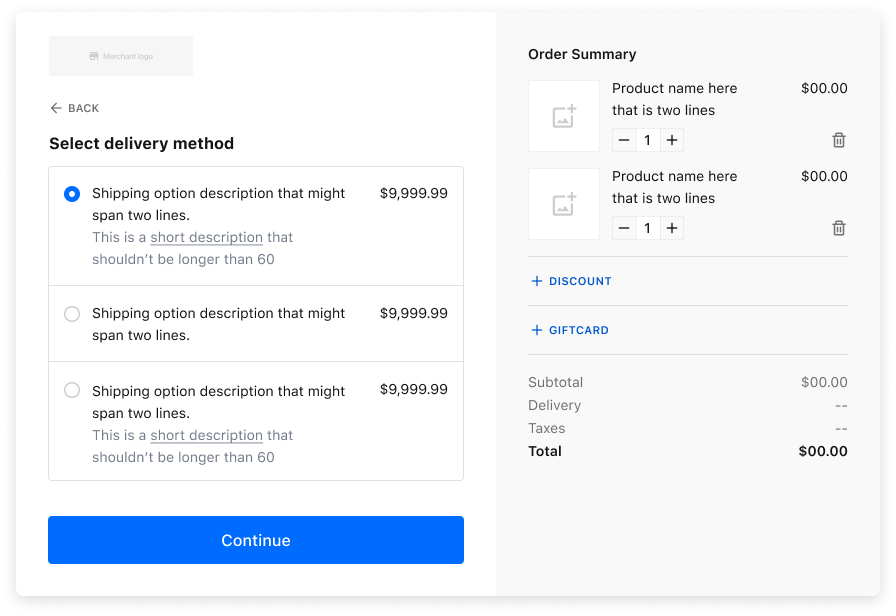
Merchants who offer specialized delivery services that need more explanation than offered by standard shipping methods. With this feature, they will have the ability to add additional delivery text with a limit of sixty (60) characters. You can choose to display a description or a tooltip.
Availability
| Platform | Supported Products |
|---|---|
|
Custom Cart / Direct API |
|
Enable Delivery Description via API
- See our Order Shipping documentation in our Merchant Callback API.
- Populate the
descriptionfield in theshipping_optionsarray. - Then, the checkout modal will display a description, as specified.
| Field | Description | Data Type | Example |
|---|---|---|---|
description |
Displays text below the delivery values in checkout. | String. | <span>Deliveries arrive within 2-3 business days.</span> |
Enable Delivery Tooltip via API
- See our Order Shipping documentation in our Merchant Callback API.
- Populate the
description_tooltipsarray in theshipping_optionsarray (targetandhtml_content). - Then, the checkout modal will display tooltip hover text, as specified.
| Field | Description | Data Type | Example |
|---|---|---|---|
target |
Creates a unique ID of the span used to display the tooltip. | String. | sampleTooltipID1234Bolt |
html_content |
The copy that will appear in a span labeled with the unique ID created with the target parameter. It supports up to 120 characters. |
String. | <a href="https://sample-site.com/promo/">Visit our site to learn more about getting this shipment free!</a> |