
Inventory Integration
Bolt’s crawler bots regularly check your web shop and update the Checkout Everywhere product catalog with any changes.
If a shopper finds your product on a publisher’s site, Bolt validates that the item is in stock and confirms the correct price before making it available for checkout in the publisher.
Order Integration
When a customer places an order, Bolt’s checkout bots synchronize the order information between your web shop/cart platform and the Checkout Everywhere Merchant Portal.
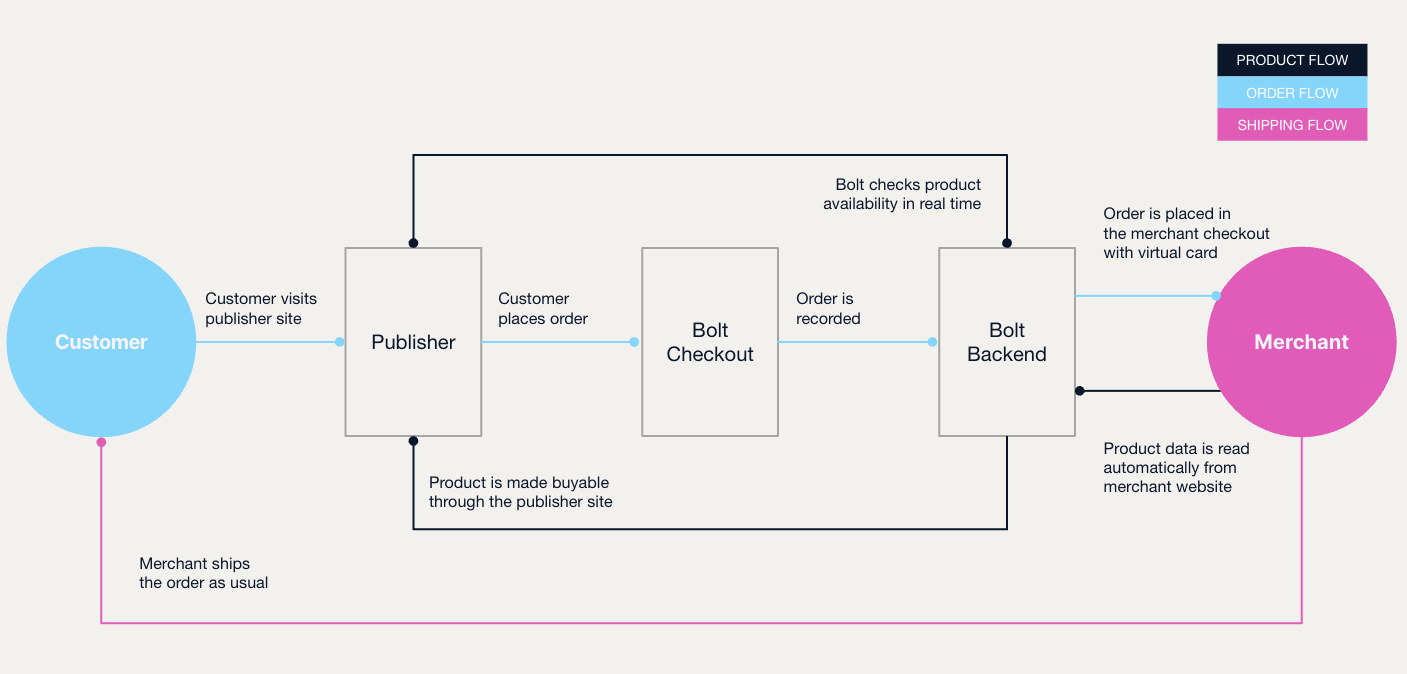
This diagram describes how Bolt’s bots interact with the purchasing flow:
Custom API
Large, complex, or bespoke systems can require a more flexible integration to work seamlessly with Bolt. Refer to the Checkout Everywhere REST API documentation for more information.
Live Update
To keep stock count, availability, and prices as accurate as possible, Bolt has implemented the ability to check this data at the most advantageous times (for example, as soon as a visitor requests this data in the frontend, or when the shopping cart is loaded). This way Bolt prevents selling products that are out of stock.
Ensuring Product Quality
The better the quality of your products, the higher the chance of selling the products. Here are some tips:
- Make sure that we can match variants. FOr example, the
item_group_idfield should have the same value for product with variants. Product with variants is the same product in multiple sizes, colors etc. All clothing should have the size attribute. The same attribute should have unique value among other variants. - Images should be of good quality and the more of them, the better. A minimum for good product is three images (
image_link,additional_image_linkfields). - Description should be detailed and contain all the information customer might be interested in.
- Include delivery time in your feed or inform us what’s the default delivery time for all your orders.
- Items with free shipping sell best, consider it (
shippingfield). - Include google product category in the feed, so we can make your product searchable easier (
google_product_categoryfield). - Include GTIN number (
gtinfield). - Take good care of the availability of your products, make sure to inform us about the stock count (
quantityfield). - If the product is targeted to specific gender, add this information in the feed (
genderfield).